

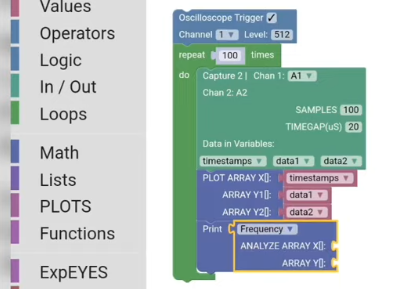
Build an oscilloscope interface
There are several simple graphical blocks that allow students to acquire and process capture data such as capture2, capture_action, set_trigger, fit_sine etc

How-To Video
The video below shows how to attach blocks together in order to get the oscilloscope working
It does the following
- Set the trigger
- Capture 2 channels - A1, A2
- Plot the acquired data
- Extract the frequency of A1 trace and show it in a sticker
- Loop multiple times