Reverse Engineer an E88 Drone app
| Links:

decompiled apk for the RC-UFO app to figure out the communication protocol. got the drone flying with python UDP
Needed python control of a sub 1000rs camera drone. The E88 pro has 2 cameras!
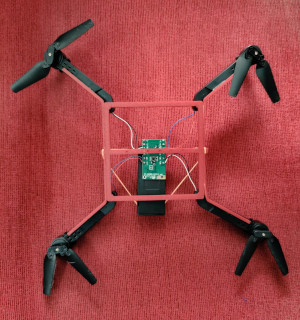 I also 3D printed a bare frame for the drone which makes it easier to explain parts to students. There are 2 PCBs : 1 with RF link to the remote, and also the sensors. and another PCB with WiFi, Camera, and a serial data output which connects it to the main board.
Decompiling the apk
To View Video stream
ffplay rtsp://192.168.1.1:7070/webcam
or with python CV
1
2
3
4
5
6
7
8
9
10
11
12
13
14
15
16
17
18
import cv2, sys
rtsp_url = "rtsp://192.168.1.1:7070/webcam"
cap = cv2.VideoCapture(rtsp_url)
if not cap.isOpened():
print(f"Error: Could not open video stream from {rtsp_url}")
sys.exit(1)
print("Successfully connected to the RTSP stream. Press 'q' to quit.")
while True:
ret, frame = cap.read()
if not ret:
print("Error: Failed to grab frame. End of stream or connection issue?")
break
cv2.imshow('Drone Stream', frame)
if cv2.waitKey(1) & 0xFF == ord('q'):
break
cap.release()
cv2.destroyAllWindows()
With help from Marshall Richards from Turbodrone, I was able to locate the part of the apk which sends bytes. What made it much easier was that it was dumping its packets via debug statements, so all i needed really was ADB .
I bought a bunch of the E88 Pro (misnomer. worse quality than E88. clickety joysticks instead of analog) for <10$ each. The app is called RC UFO, but same dev. The table shows the data packets, where first byte is a 0x03, making it a total of 9 bytes. It neatly outputs byte 0-7 in the ADB logs. So was very easy to figure out which byte did what, but to locate the prefixed 0x03(drone won’t budge without it), I had to go read the decompiled source. JAD

class="highlight">1
2
3
4
5
6
7
8
9
10
11
12
13
BYTE -1: 3
BYTE 0 : 102
BYTE 1 : ROLL (128 centered)
BYTE 2 : PITCH (128 centered)
BYTE 3 : UP/DOWN
BYTE 4: YAW
BYTE 5
1 = takeoff
2 = land
4 = emergency stop
128 = calibrate
BYTE 6 : XOR of bytes 1-5
BYTE 7: 0x99
This is pretty much it, and here’s an example code.
class="highlight">1
2
3
4
5
6
7
8
9
10
self.basebytes = bytearray(b'\x66\x80\x80\x80\x80\x00\x00\x99')
def xor(self,bs):
s=0
for byte_value in bs[1:6]:
s ^= byte_value
bs[6]=s
return bs
self.send_udp_command(bytes(bytearray(b'\x03') + self.basebytes)) # Tack on the 0x03
There’s also a command to switch between the two cameras, but if you don’t properly pause the rtsp feed , it messes it up. \x06\x01 , and \x06\x02
Community Contribution
I have uploaded my work to the experimental section of the Turbodrone project by Marshall Richards
Functioning PyQt software
Features
One touch takeoff, land, flip(all ways), fly around, view video feed. Finicky features: Switching camera feed , one touch land(falls out of the sky sometimes while landing. might be a battery thing)
Controls
- Z : one touch takeoff
- X : land (careful)
- C : Calibrate gyro
- W/S : throttle
- A/D : YAW
- UP/DOWN: PITCH
- LEFT/RIGHT: roll
- F: FLIP (combine with up/down/left/right to specify direction of flip
- H: toggle headless mode
- 1,2 : camera selection. barely works.
class="highlight">1
2
3
4
5
6
7
8
9
10
11
12
13
14
15
16
17
18
19
20
21
22
23
24
25
26
27
28
29
30
31
32
33
34
35
36
37
38
39
40
41
42
43
44
45
46
47
48
49
50
51
52
53
54
55
56
57
58
59
60
61
62
63
64
65
66
67
68
69
70
71
72
73
74
75
76
77
78
79
80
81
82
83
84
85
86
87
88
89
90
91
92
93
94
95
96
97
98
99
100
101
102
103
104
105
106
107
108
109
110
111
112
113
114
115
116
117
118
119
120
121
122
123
124
125
126
127
128
129
130
131
132
133
134
135
136
137
138
139
140
141
142
143
144
145
146
147
148
149
150
151
152
153
154
155
156
157
158
159
160
161
162
163
164
165
166
167
168
169
170
171
172
173
174
175
176
177
178
179
180
181
182
183
184
185
186
187
188
189
190
191
192
193
194
195
196
197
198
199
200
201
202
203
204
205
206
207
208
209
210
211
212
213
214
215
216
217
218
219
220
221
222
223
224
225
226
227
228
229
230
231
232
233
234
235
236
237
238
239
240
241
242
243
244
245
246
247
248
249
250
251
252
253
254
255
256
257
258
259
260
261
262
263
264
265
266
267
268
269
270
271
272
273
274
275
276
277
278
279
280
281
282
283
284
285
286
287
288
289
290
291
292
293
294
295
296
297
298
299
300
301
302
303
304
305
306
307
308
309
310
311
312
313
314
315
316
317
318
319
320
321
322
323
324
325
326
327
328
329
330
331
332
333
334
335
336
337
338
339
340
341
342
343
344
345
346
347
348
349
350
351
352
353
354
355
356
357
358
359
360
361
362
363
364
365
366
367
368
369
370
371
372
373
374
375
376
377
378
379
380
381
382
383
384
385
386
387
388
389
390
391
392
393
394
395
396
397
398
399
400
401
402
403
404
405
406
407
408
409
410
411
412
413
414
415
416
417
418
419
420
421
422
423
424
425
426
427
'''
Author: jithinbp@gmail.com
For the E88pro drone which is under 10$
Features: One touch takeoff, land, flip(all ways), fly around, view video feed.
Finicky features: Switching camera feed , one touch land(falls out of the sky sometimes while landing. might be a battery thing)
Controls
Z : one touch takeoff
X : land (careful)
C : Calibrate gyro
W/S : throttle
A/D : YAW
UP/DOWN: PITCH
LEFT/RIGHT: roll
F: FLIP (combine with up/down/left/right to specify direction of flip
H: toggle headless mode
1,2 : camera selection. barely works.
'''
import sys
import socket
import cv2
import time # Import time for delays
from PyQt5.QtWidgets import QApplication, QMainWindow, QLabel, QPushButton, QVBoxLayout, QWidget, QMessageBox
from PyQt5.QtGui import QImage, QPixmap
from PyQt5.QtCore import QThread, pyqtSignal, pyqtSlot, Qt, QByteArray, QTimer
# --- Constants ---
RTSP_URL = "rtsp://192.168.1.1:7070/webcam"
UDP_IP = "192.168.1.1" # This is the target IP for sending commands
UDP_SEND_PORT = 7099 # Port for sending commands
UDP_LISTEN_PORT = 7099 # Port for listening to responses (assuming same port for simplicity, adjust if different)
UDP_UP_COMMAND = b'\x06\x01' # Byte sequence for UP command
UDP_DOWN_COMMAND = b'\x06\x02' # Byte sequence for DOWN command
UDP_BUFFER_SIZE = 1024 # Buffer size for UDP receive
STREAM_REINITIALIZE_DELAY_SEC = 2 # Delay before attempting to re-open stream after disruption
# --- Video Stream Thread ---
class VideoStreamThread(QThread):
"""
A QThread subclass to handle video capture from an RTSP stream.
It emits a QPixmap signal for each new frame.
"""
change_pixmap_signal = pyqtSignal(QPixmap)
error_signal = pyqtSignal(str)
def __init__(self, rtsp_url):
super().__init__()
self._rtsp_url = rtsp_url
self._run_flag = True
self._reinitialize_flag = False # New flag to trigger stream re-initialization
self._cap = None
self._paused = False
def run(self):
"""
Main loop for video capture. Reads frames and emits them as QPixmap.
Handles stream opening, reading, and re-initialization.
"""
while self._run_flag:
if self._paused:
continue
if self._reinitialize_flag:
# If re-initialization is requested, release current capture and prepare to re-open
print("Re-initializing video stream...")
if self._cap:
self._cap.release()
self._cap = None
self.msleep(int(STREAM_REINITIALIZE_DELAY_SEC * 1000)) # Wait before re-opening
self._reinitialize_flag = False # Clear the flag
if not self._cap or not self._cap.isOpened():
print(f"Attempting to open RTSP stream: {self._rtsp_url}")
self._cap = cv2.VideoCapture(self._rtsp_url)
if not self._cap.isOpened():
self.error_signal.emit(f"Error: Could not open RTSP stream at {self._rtsp_url}. "
"Please check the URL and network connection.")
self.msleep(1000) # Wait before retrying to open
continue # Try again in the next loop iteration
print("RTSP stream opened successfully.")
# Attempt to read a frame
ret, cv_img = self._cap.read()
if ret:
# Convert OpenCV image to QPixmap
qt_format = QImage.Format_RGB888
if len(cv_img.shape) == 3 and cv_img.shape[2] == 3: # Check if it's a color image
rgb_image = cv2.cvtColor(cv_img, cv2.COLOR_BGR2RGB)
# Rotate the image 90 degrees clockwise
rgb_image = cv2.rotate(rgb_image, cv2.ROTATE_90_CLOCKWISE)
h, w, ch = rgb_image.shape
bytes_per_line = ch * w
convert_to_qt_format = QImage(rgb_image.data, w, h, bytes_per_line, qt_format)
p = convert_to_qt_format.scaled(640, 480, Qt.KeepAspectRatio) # Scale for display
self.change_pixmap_signal.emit(QPixmap.fromImage(p))
else:
print("Warning: Received non-RGB image, skipping display.")
else:
# If reading fails, assume stream disruption and trigger re-initialization
print("Warning: Failed to read frame from RTSP stream. Triggering re-initialization.")
self.error_signal.emit(f"Stream disrupted. Attempting to re-establish connection to {self._rtsp_url}.")
self._reinitialize_flag = True # Set flag to re-initialize in next loop iteration
if self._cap: # Release immediately to avoid blocking
self._cap.release()
self._cap = None
self.msleep(30) # Small delay to prevent busy-waiting and reduce CPU usage
print("Video stream thread stopping.")
if self._cap:
self._cap.release()
print("RTSP stream released.")
def stop(self):
"""Stops the video stream thread gracefully."""
self._run_flag = False
self.wait() # Wait for the thread to finish its execution
@pyqtSlot()
def reinitialize_stream(self):
"""
Slot to trigger a full re-initialization of the video stream.
This is called when a known disruption (like a camera switch) occurs.
"""
self._reinitialize_flag = True
print("Re-initialization requested for video stream.")
# --- UDP Listener Thread ---
class UDPListenerThread(QThread):
"""
A QThread subclass to listen for incoming UDP data.
It emits a signal with the received data.
"""
data_received_signal = pyqtSignal(bytes, tuple) # Signal to emit data and sender address
error_signal = pyqtSignal(str)
def __init__(self, port, buffer_size):
super().__init__()
self._listen_ip = "" # We bind to "" (0.0.0.0) to listen on all available local interfaces
self._port = port
self._buffer_size = buffer_size
self._run_flag = True
self._sock = None
def run(self):
"""
Main loop for UDP listening. Receives data and emits it.
"""
try:
self._sock = socket.socket(socket.AF_INET, socket.SOCK_DGRAM) # UDP socket
self._sock.setsockopt(socket.SOL_SOCKET, socket.SO_REUSEADDR, 1) # Allow reusing the address
# Bind to all available network interfaces on the specified port
self._sock.bind((self._listen_ip, self._port))
self._sock.settimeout(1.0) # Set a timeout to allow graceful shutdown
print(f"UDP listener started on {self._listen_ip}:{self._port} (listening on all interfaces)")
except socket.error as e:
self.error_signal.emit(f"Error binding UDP socket to {self._listen_ip}:{self._port}: {e}")
self._run_flag = False
return
while self._run_flag:
try:
data, addr = self._sock.recvfrom(self._buffer_size)
self.data_received_signal.emit(data, addr)
print(f"Received UDP data from {addr}: {data.hex()}")
except socket.timeout:
# Timeout occurred, continue loop to check _run_flag
pass
except socket.error as e:
if self._run_flag: # Only report error if not intentionally stopping
self.error_signal.emit(f"UDP receive error: {e}")
break # Exit loop on persistent error
print("UDP listener thread stopping.")
if self._sock:
self._sock.close()
print("UDP socket closed.")
def stop(self):
"""Stops the UDP listener thread gracefully."""
self._run_flag = False
if self._sock:
# A small trick to unblock recvfrom if it's blocking
try:
self._sock.shutdown(socket.SHUT_RDWR)
except OSError:
pass # Socket might already be closed or in a bad state
self.wait() # Wait for the thread to finish
# --- Main Application Window ---
class RTSPViewerApp(QMainWindow):
"""
Main application window for RTSP viewing and UDP control.
"""
SOMERSAULT = 8
HEADLESS = 16
def __init__(self):
super().__init__()
self.setWindowTitle("RTSP Stream Viewer & Device Control")
self.setGeometry(100, 100, 800, 700) # Adjusted height to accommodate new label
self.central_widget = QWidget()
self.setCentralWidget(self.central_widget)
self.layout = QVBoxLayout(self.central_widget)
# Video display label
self.image_label = QLabel(self)
self.image_label.setFixedSize(640, 480) # Fixed size for video display
self.image_label.setAlignment(Qt.AlignCenter)
self.image_label.setStyleSheet("background-color: black; border: 1px solid gray;")
self.layout.addWidget(self.image_label, alignment=Qt.AlignCenter)
self.flip=False
self.headless=False
self.cam=0
# Control buttons
self.up_button = QPushButton("UP")
self.up_button.setFixedSize(100, 40)
self.up_button.clicked.connect(self.on_up_button_clicked)
self.layout.addWidget(self.up_button, alignment=Qt.AlignCenter)
self.down_button = QPushButton("DOWN")
self.down_button.setFixedSize(100, 40)
self.down_button.clicked.connect(self.on_down_button_clicked)
self.layout.addWidget(self.down_button, alignment=Qt.AlignCenter)
# UDP response display label
self.udp_response_label = QLabel("UDP Response: None", self)
self.udp_response_label.setAlignment(Qt.AlignCenter)
self.udp_response_label.setStyleSheet("font-weight: bold; color: blue;")
self.layout.addWidget(self.udp_response_label, alignment=Qt.AlignCenter)
# Initialize video thread
video = True
if video:
self.video_thread = VideoStreamThread(RTSP_URL)
self.video_thread.change_pixmap_signal.connect(self.update_image)
self.video_thread.error_signal.connect(self.show_error_message)
self.video_thread.start()
# Initialize UDP listener thread
self.udp_listener_thread = UDPListenerThread(UDP_LISTEN_PORT, UDP_BUFFER_SIZE)
self.udp_listener_thread.data_received_signal.connect(self.update_udp_response)
self.udp_listener_thread.error_signal.connect(self.show_error_message)
self.udp_listener_thread.start()
# Add a placeholder for when video is not loaded
self.image_label.setText("Loading RTSP stream...")
self.image_label.setStyleSheet("background-color: black; color: white; border: 1px solid gray;")
self.sock = socket.socket(socket.AF_INET, socket.SOCK_DGRAM) # UDP socket
# Ensure the widget itself can receive key press events
# We also want it to be able to re-gain focus after buttons are clicked
self.setFocusPolicy(Qt.StrongFocus)
# Create a QTimer for periodic voltage measurement
self.accel = 50
self.decel = 5
self.send_udp_command(b'\x08\x01')
self.timer = QTimer(self)
self.last_heartbeat = time.time()
self.timer.timeout.connect(self.send) # Connect the timeout signal to the update method
self.timer.start(30) # Start the timer with an interval
#byte0:102,byte1:128,byte2:128,byte3:128,byte4:128,byte5:0,byte6:0,byte7:153
self.basebytes = bytearray(b'\x66\x80\x80\x80\x80\x00\x00\x99')
def send(self):
if self.flip:
self.basebytes[5]+=self.SOMERSAULT
if self.headless:
self.basebytes[5]+=self.HEADLESS
self.send_udp_command(bytes(bytearray(b'\x03') + self.basebytes))
if time.time() - self.last_heartbeat > 1:
self.send_udp_command(b'\x01\x01')
self.last_heartbeat = time.time()
if self.cam>0:
self.video_thread._paused = True
time.sleep(1)
l = bytearray(b'\x06')
l.append(self.cam)
self.send_udp_command(bytes(l))
self.cam=0
time.sleep(1)
self.video_thread._paused = False
self.video_thread.reinitialize_stream()
self.basebytes[5] = 0
for a in range(1,5):
if (self.basebytes[a]>128):
self.basebytes[a]-=self.decel
elif (self.basebytes[a]<128):
self.basebytes[a]+=self.decel
def xor(self,bs):
s=0
for byte_value in bs[1:6]:
s ^= byte_value
bs[6]=s
return bs
def keyPressEvent(self, event):
if event.key() == Qt.Key_Up: #Forward (pitch down)
if self.basebytes[2]<200:
self.basebytes[2]+=self.accel
event.accept() # Crucial: tell PyQt we handled this event
elif event.key() == Qt.Key_Down: #Back (pitch up)
if self.basebytes[2]>50:
self.basebytes[2]-=self.accel
event.accept() # Crucial: tell PyQt we handled this event
elif event.key() == Qt.Key_Left: #Roll left
if self.basebytes[1]>50:
self.basebytes[1]-=self.accel
event.accept() # Crucial: tell PyQt we handled this event
elif event.key() == Qt.Key_Right: #Roll right
if self.basebytes[1]<200:
self.basebytes[1]+=self.accel
event.accept() # Crucial: tell PyQt we handled this event
elif event.key() == Qt.Key_W:
if self.basebytes[3]<200:
self.basebytes[3]+=self.accel
event.accept() # Crucial: tell PyQt we handled this event
elif event.key() == Qt.Key_S:
if self.basebytes[3]>50:
self.basebytes[3]-=self.accel
event.accept() # Crucial: tell PyQt we handled this event
elif event.key() == Qt.Key_D:
if self.basebytes[4]<200:
self.basebytes[4]+=self.accel
event.accept() # Crucial: tell PyQt we handled this event
elif event.key() == Qt.Key_A:
if self.basebytes[4]>50:
self.basebytes[4]-=self.accel
event.accept() # Crucial: tell PyQt we handled this event
elif event.key() == Qt.Key_Z: #Takeoff
self.basebytes[5] = 1
event.accept() # Crucial: tell PyQt we handled this event
elif event.key() == Qt.Key_X: #Land
self.basebytes[5] = 2
event.accept() # Crucial: tell PyQt we handled this event
elif event.key() == Qt.Key_C: #Calibrate
self.basebytes[5] = 128
event.accept() # Crucial: tell PyQt we handled this event
elif event.key() == Qt.Key_F: #Flip 360
self.flip = True
event.accept() # Crucial: tell PyQt we handled this event
elif event.key() == Qt.Key_H: #Headless
self.headless = not self.headless
event.accept() # Crucial: tell PyQt we handled this event
elif event.key() == Qt.Key_1: #cam 1
self.cam=1
event.accept() # Crucial: tell PyQt we handled this event
elif event.key() == Qt.Key_2: #cam 2
self.cam=2
event.accept() # Crucial: tell PyQt we handled this event
else:
# For other keys, let the default behavior happen
print(event.key())
super().keyPressEvent(event)
@pyqtSlot(QPixmap)
def update_image(self, pixmap):
"""Slot to update the QLabel with new video frames."""
self.image_label.setPixmap(pixmap)
self.image_label.setText("") # Clear loading text once video starts
@pyqtSlot(bytes, tuple)
def update_udp_response(self, data, addr):
"""Slot to update the QLabel with received UDP data."""
self.udp_response_label.setText(f"UDP Response from {addr[0]}:{addr[1]}: {data.hex()}")
@pyqtSlot(str)
def show_error_message(self, message):
"""Slot to display error messages in a QMessageBox."""
#QMessageBox.critical(self, "Error", message)
# For stream errors, keep the error message on the image label
if "Stream disrupted" in message or "Could not open RTSP stream" in message:
self.image_label.setText("Stream Error: " + message)
self.image_label.setStyleSheet("background-color: red; color: white; border: 1px solid gray;")
# Do not disable buttons for temporary stream disruptions, as they are part of control flow
else: # For other errors (e.g., UDP binding)
self.udp_response_label.setText("UDP Error: " + message)
self.udp_response_label.setStyleSheet("font-weight: bold; color: red;")
def send_udp_command(self, command):
"""Sends a UDP command to the specified IP and port."""
try:
self.sock.sendto(command, (UDP_IP, UDP_SEND_PORT))
#print(f"Sent UDP command: {command.hex()} to {UDP_IP}:{UDP_SEND_PORT}")
except socket.error as e:
#QMessageBox.warning(self, "Network Error", f"Failed to send UDP command: {e}")
print(f"UDP send error: {e}")
def on_up_button_clicked(self):
"""Handler for the UP button click."""
self.send_udp_command(UDP_UP_COMMAND)
# Give the device a moment to switch cameras and stabilize the stream
time.sleep(0.5) # Small delay after sending command
self.video_thread.reinitialize_stream() # Trigger full stream re-initialization
def on_down_button_clicked(self):
"""Handler for the DOWN button click."""
self.send_udp_command(UDP_DOWN_COMMAND)
# Give the device a moment to switch cameras and stabilize the stream
time.sleep(0.5) # Small delay after sending command
self.video_thread.reinitialize_stream() # Trigger full stream re-initialization
def closeEvent(self, event):
"""Ensures all threads are stopped when the application closes."""
print("Closing application. Stopping video and UDP threads...")
self.video_thread.stop()
self.udp_listener_thread.stop()
event.accept()
# --- Main execution ---
if __name__ == "__main__":
app = QApplication(sys.argv)
window = RTSPViewerApp()
window.show()
sys.exit(app.exec_())