Pendulum Tracking with OpenCV
| Links:
A downward pointed webcam served as the input device, and python-opencv based image processing routines enabled extracting the torsion angle from the live video feed. The pendulum itself consisted of a stick suspended from spider silk.
Results
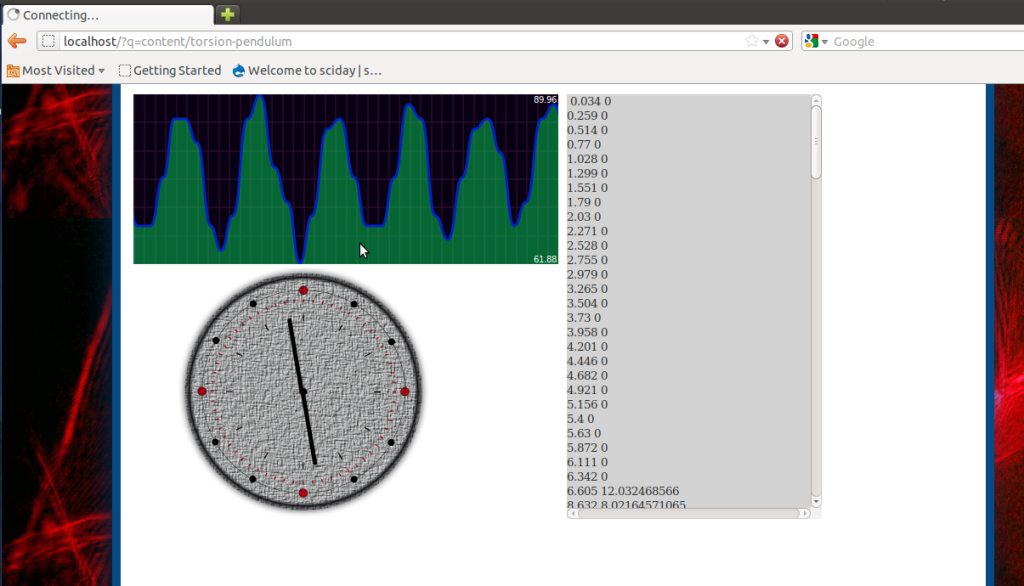 A local webserver was setup using Apache, and Drupal CMS was installed. On top of the fancy Drupal environment, a Jquery+Ajax webpage was coded to fetch values from the server and display an animation corresponding to the angle. Jquery.flot was used to plot the obtained values inside the browser page
Source Code
Backend Server
class="highlight">
1
2
3
4
5
6
7
8
9
10
11
12
13
14
15
16
17
18
19
20
21
22
23
24
25
26
27
28
29
30
31
32
33
34
35
36
37
38
39
40
41
42
43
44
45
46
47
48
49
50
51
52
53
54
55
56
57
58
59
60
61
62
63
64
65
66
67
68
69
70
71
72
73
74
75
76
77
78
79
80
81
82
83
84
85
86
87
88
89
90
91
92
93
94
95
96
97
98
99
100
101
102
103
104
105
106
107
108
109
110
111
112
113
114
115
116
117
118
119
120
121
122
123
124
125
126
127
128
129
130
131
132
133
134
135
136
137
138
139
140
141
142
143
144
145
146
147
148
149
150
151
152
153
154
155
156
157
158
159
160
161
162
163
164
165
166
167
168
169
170
171
172
173
174
175
176
177
178
179
180
181
182
183
184
185
186
187
188
189
190
191
192
193
194
195
196
197
198
199
200
201
202
203
204
205
206
import cv2,os
import cv2.cv as cv
import time,thread
import numpy as np
from Tkinter import *
from PIL import Image,ImageTk
import math
from image_handler import *
BLUE=0
GREEN=1
RED=2
laser_color=GREEN
WIDTH=640
HEIGHT=480
RATIO=WIDTH/float(HEIGHT)
THUMBWIDTH=300
THUMBHEIGHT=300
SCALE=0.4
LIVE_REFRESH=100
start=[100,0]
end=[400,478]
connected_sources=find_cams()
files=os.listdir('.')
video_formats=['webm','avi','mpg']
for x in files:
l=x.split('.')
if(len(l)>1):
if(l[1] in video_formats):
connected_sources.append(x)
print connected_sources
source = set_cam(0)
def about():
global root
t=Toplevel(root,bg='black')
l=Label(t,text="Author: Jithin B.P.")
l.pack(side=TOP)
def updater():
global smoothen,latest_frame,rho,theta,ser,clientpool,ang,source
global x1,x2
latest_frame,theta,rho = get_image(capture_image(smoothen) )
size=cv2.cv.GetSize(latest_frame)
src_rgb = cv2.cv.CreateMat(size[1],size[0], cv.CV_8UC3)
cv.CvtColor(latest_frame, src_rgb, cv.CV_BGR2RGB)
latest_frame=src_rgb
latest_frame = Image.fromstring("RGB", cv.GetSize(latest_frame),latest_frame.tostring())
latest_frame=ImageTk.PhotoImage(latest_frame)
image_frame.create_image(0,0,image = latest_frame, anchor = NW)
image_frame.image=latest_frame
try:
t=source.get(1)
tm='%d : %d'%(t/60,t%60)
ang.config(text=' ANGLE=%f . TIME:%s '%(theta,tm) )
except:
ang.config(text=' ANGLE=%f . TIME:__'%(theta) )
root.after(LIVE_REFRESH,updater)
def angle_stream():
global rho,theta,ser,clientpool,lock
time.sleep(2)
while 1:
try:
clientpool.put ( ser.accept() )
lock.acquire()
conn = clientpool.get() #check for waiting clients
stream=conn[0].recv(20)
#print conn[1][0],stream #echo user details to server terminal
msg='%.2f'%(theta)
print stream,'reply :',msg
conn[0].send(msg)
conn[0].close() #close the connection
lock.release()
del conn
except:
pass
cv.NamedWindow("image", 1)
#-------------------------- CONSTRUCT INTERFACE ------------
root=Tk()
root.geometry(("%dx%d")%(640,580))
menubar = Menu(root)
filemenu = Menu(menubar, tearoff=0)
camvar=IntVar()
def select_cam():
global camvar,CAM_CHANGING,CAM_BUSY,connected_sources
while CAM_BUSY:
pass
CAM_CHANGING=True
set_cam(connected_sources[camvar.get()] )
CAM_CHANGING=False
n=0
for x in connected_sources:
if(type(x)==int): l='camera :'+str(x)
else: l=x
filemenu.add_radiobutton(label=l, command=select_cam,variable=camvar,value=n)
n+=1
filemenu.add_separator()
filemenu.add_command(label="Exit", command=root.quit)
menubar.add_cascade(label="Select Source", menu=filemenu)
helpmenu = Menu(menubar, tearoff=0)
helpmenu.add_command(label="Help Index")
helpmenu.add_command(label="About...",command=about)
menubar.add_cascade(label="Help", menu=helpmenu)
zoom=1.0
angle=0
Canvas(root, width = WIDTH, height = 20).pack(side=TOP) # Some space at the top
cf = Frame(root, width = WIDTH, height = 10)
cf.pack(side=TOP, fill = BOTH)
laser_color = IntVar()
Label(cf,text = 'Laser Color :').pack(side=LEFT)
R2 = Radiobutton(cf, text="RED", variable=laser_color, value=RED)
R2.pack( side = LEFT )
R1 = Radiobutton(cf, text="GREEN", variable=laser_color, value=GREEN)
R1.pack(side = LEFT)
R3 = Radiobutton(cf, text="BLUE", variable=laser_color, value=BLUE)
R3.pack(side = LEFT)
laser_color.set(GREEN)
online = IntVar()
online.set(True)
cb1 = Checkbutton(cf,text ='live online preview', variable=online, fg = 'blue')
cb1.pack(side=RIGHT)
cf3 = Frame(root)
cf3.pack(side=TOP, fill = BOTH)
Label(cf3,text = 'Smoothen').pack(side=LEFT)
smoothen = Scale(cf3,orient=HORIZONTAL, length=200, showvalue=True, from_ = 0, to=10, resolution=1)
smoothen.pack(side=LEFT)
smoothen.set(2)
xoffset=0
yoffset=30
ang = Label(cf3,text =' ANGLE=',fg = 'blue')
ang.pack(side=LEFT)
image_frame = Canvas(root, bg='black',width = 640, height = 480)
image_frame.pack(side=TOP)
root.title('Angle server')
root.after(LIVE_REFRESH,updater)
root.config(menu=menubar)
import socket,Queue
ser = socket.socket(socket.AF_INET, socket.SOCK_STREAM)
PORT=2008
while PORT<2010:
try:
ser.bind(('127.0.0.1', PORT))
break
except:
PORT+=1
print 'PORT ',PORT
ser.listen(10)
#ser.setblocking(0)
clientpool = Queue.Queue (0 )
lock=thread.allocate()
thread.start_new_thread(angle_stream,())
root.mainloop()
ser.close()
print 'bye bye'
Image Tracking
class="highlight">1
2
3
4
5
6
7
8
9
10
11
12
13
14
15
16
17
18
19
20
21
22
23
24
25
26
27
28
29
30
31
32
33
34
35
36
37
38
39
40
41
42
43
44
45
46
47
48
49
50
51
52
53
54
55
56
57
58
59
60
61
62
63
64
65
66
67
68
69
70
71
72
73
74
75
76
77
78
79
80
81
82
83
84
85
86
87
88
89
90
91
92
93
94
95
96
97
98
99
100
101
102
103
104
105
106
107
108
109
110
111
112
113
114
115
116
117
118
119
120
121
122
123
124
125
126
127
128
129
130
131
132
133
134
135
136
137
138
139
140
141
142
import cv2
import cv2.cv as cv
import numpy as np
connected_cams=[]
CAM_BUSY=False
CAM_CHANGING=False
WIDTH=640
HEIGHT=480
RATIO=WIDTH/float(HEIGHT)
THUMBWIDTH=300
THUMBHEIGHT=300
SCALE=0.4
font = cv.InitFont(cv.CV_FONT_HERSHEY_COMPLEX,1, 1, 0.0, 2, cv.CV_AA)
vidfile = cv2.VideoWriter('video.avi',cv.CV_FOURCC('X','V','I','D'),5.5,(640,480))
def find_cams():
global connected_cams
for i in range(5):
temp_camera = cv2.VideoCapture(i)
temp_frame = temp_camera.read()[1]
del(temp_camera)
if temp_frame==None:
del(temp_frame)
else:
connected_cams.append(i)
return connected_cams
def set_cam(num):
global camcapture
try: del(camcapture)
except: pass
camcapture = cv2.VideoCapture(num)
#cv.SetCaptureProperty(camcapture,cv.CV_CAP_PROP_FRAME_WIDTH, WIDTH)
#cv.SetCaptureProperty(camcapture,cv.CV_CAP_PROP_FRAME_HEIGHT, HEIGHT);
if not camcapture:
print "Error opening WebCAM"
sys.exit(1)
return camcapture
def capture_image(smoothen):
global CAM_BUSY,latest_frame,camcapture
CAM_BUSY=True
print 'camcap',camcapture
result,latest_frame = camcapture.read()
CAM_BUSY=False
#print result,latest_frame
latest_frame=cv2.cv.fromarray(latest_frame)
for a in range(smoothen.get()):
cv.Smooth(latest_frame,latest_frame,cv.CV_GAUSSIAN,9,9)
return latest_frame
def get_image(latest_frame):
lf=np.asarray( latest_frame[:,:] )
gray = cv2.cvtColor(lf, cv2.COLOR_BGR2GRAY)
m,n = gray.shape
edges = cv2.Canny(gray, 40, 60)
found_line=0
if np.count_nonzero(edges)>2:
lines = cv2.HoughLines(edges, 2, np.pi/90, 50)
plines = cv2.HoughLinesP(edges, 1, np.pi/180, 20, np.array([]), 10)
if lines is not None:
if len(lines)>0:
found_line=1
for (rho, theta) in lines[0][:1]:
x0 = np.cos(theta)*rho
y0 = np.sin(theta)*rho
pt1 = ( int(x0 + (m+n)*(-np.sin(theta))), int(y0 + (m+n)*np.cos(theta)) )
pt2 = ( int(x0 - (m+n)*(-np.sin(theta))), int(y0 - (m+n)*np.cos(theta)) )
cv2.line(lf, pt1, pt2, (255,0,0), 2)
if plines is not None:
for l in plines[0][:3]:
# red for line segments
cv2.line(lf, (l[0],l[1]), (l[2],l[3]), (0,0,255), 2)
vidfile.write(lf)
latest_frame=cv2.cv.fromarray(lf)
if(found_line):
cv.PutText(latest_frame, 'theta=%f rho=%f'%(theta,rho),(10,30), font, cv.RGB(0, 0, 255))
return latest_frame,theta,rho
else:
return latest_frame,0.0,0.0
#cv.Smooth(frame,frame,cv.CV_GAUSSIAN,9,9)
#cv.Dilate(frame,frame,None,5)
#cv.Erode(frame,frame,None,1)
#cv.Smooth(frame,frame,cv.CV_GAUSSIAN)
#hsv = cv.CreateImage(cv.GetSize(im), 8, 3)
#cv.CvtColor(im, hsv, cv.CV_BGR2HSV)
def rotateImage(image, angle,yoffset,scale=1.0):
image0=image
if hasattr(image, 'shape'):
image_center = tuple(np.array(image.shape)/2)
shape = tuple(image.shape)
elif hasattr(image, 'width') and hasattr(image, 'height'):
image_center = tuple(np.array((image.width/2, image.height/2)))
shape = (image.width, image.height)
else:
raise Exception, 'Unable to acquire dimensions of image for type %s.' % (type(image),)
new_width=int(shape[0]*scale)
new_height=int(shape[1]*scale)
image = np.asarray( image[:,:] )
rot_mat = cv2.getRotationMatrix2D(image_center,angle,1.0)
simplethumb=cv2.resize(image,(int(shape[0]*0.5),int(shape[1]*0.5) ))
result = cv2.warpAffine(image, rot_mat, shape,flags=cv2.INTER_LINEAR)
thumb=cv2.resize(result,(new_width,new_height))
cv2.line(thumb, (0,THUMBHEIGHT/2-yoffset), (new_width,THUMBHEIGHT/2-yoffset), cv2.cv.CV_RGB(255, 255, 255), 1)
#image_scaled=cv2.cv.fromarray(image)
cv.SetData(image0, result.tostring())
return image0,cv2.cv.fromarray(thumb),cv2.cv.fromarray(simplethumb)
def extract_line(frame,x1,x2,H,laser_color):
xa=[]
ya=[]
x=x1
width,height=cv.GetSize(frame)
data_array=[]
col=laser_color.get()
while x<x2:
if x<width and x>0 and H<height and H>0:
pixel_value = cv.Get2D(frame, int(H) , int(x))
else:
pixel_value=[0,0,0]
xa.append(x) #BGR B=0,G=1,R=2
ya.append(pixel_value[col])
data_array.append([x,pixel_value[col]])
x+=1
return xa,ya,data_array